Here is a sentence that surprises almost everyone the first time they hear it: your Bitcoin wallet does not contain any bitcoin.
The coins themselves live on the blockchain, the public record of every Bitcoin transaction that thousands of computers keep identical copies of. What a wallet holds is a private key, a very large secret number that proves you are allowed to move a particular set of coins. Whoever has the key controls the bitcoin. Nobody else, not even a court or a bank, can move it without that key.
So the real question behind "where should I keep my bitcoin?" is "where should I keep my key?" And the answer comes down to one dividing line: does the key ever touch a device that is connected to the internet?
The Key Is the Money
When you send bitcoin, your wallet uses the private key to create a digital signature, a piece of math that proves the owner approved the payment without revealing the key itself. The Bitcoin whitepaper describes a coin as exactly this: a chain of digital signatures, each owner signing it over to the next. The private and public keys article explains how the math works.
Most wallets today back up your key as a seed phrase: a list of ordinary words, usually 12 or 24, drawn from a standard list of 2,048 words defined in a Bitcoin standard called BIP 39. Those words can rebuild every key in the wallet on any compatible device. That makes them extremely powerful. Anyone who sees your seed phrase can take your bitcoin, and if you lose it along with your device, nobody can recover it for you.
Hot Wallets: Your Pocket Cash
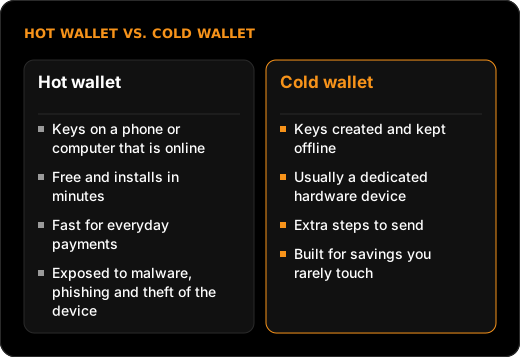
A hot wallet is any wallet whose keys live on an internet-connected device, usually a phone app or a computer program. "Hot" just means online.
Hot wallets are free, take minutes to set up, and make sending bitcoin as easy as scanning a code. That convenience comes from the same place as the risk: because the device is online, the key is exposed to whatever else is on that device. Malware, a fake app that looks like a real one, a phishing site that tricks you into typing your seed phrase, or a stolen and unlocked phone can all lead to lost coins.
Analogy: A hot wallet is like the cash in your pocket. It is right there when you need it, and you would not panic about losing a small amount. But you would never walk around with your life savings in your jacket.
Cold Wallets: The Safe in the Basement
A cold wallet keeps the private key offline. The most common form is a hardware wallet, a small dedicated device (Ledger and Trezor are two well-known makers) that generates the key inside itself and never lets it out.
When you want to send bitcoin, your phone or computer prepares the transaction, the hardware device signs it internally, and only the signature comes back out. Even if your computer were full of malware, the key itself would never be exposed. Most hardware wallets also show the destination address on their own small screen, so you can check that nothing swapped it on the way.
The trade-offs are cost (hardware wallets are bought, not downloaded), a few extra steps for every payment, and new responsibility: you must store the seed phrase backup somewhere safe, offline and private. The getBTC hardware wallet comparison lays out the main devices side by side.
The Third Option: Letting Someone Else Hold It
Many people never use a wallet at all, at first. When you buy on an exchange and leave the coins there, the exchange holds the keys for you. This is called a custodial account. A wallet where you hold your own keys is non-custodial, or "self-custody."
Custodial accounts are simple and come with password resets and customer support. The cost is trust. When the Japanese exchange Mt. Gox failed in 2014, it reported that about 850,000 bitcoin had disappeared, roughly 750,000 of them belonging to customers. (A month later it said it had found about 200,000 in an old wallet.) When FTX collapsed in November 2022, customers were locked out of their funds, and the SEC later charged its founder with diverting customer money to his own crypto hedge fund. In both cases, the Bitcoin network itself kept running perfectly. The failure was in the company holding the keys.
| Storage option | Who holds the key | Convenience | Main risk |
|---|---|---|---|
| Exchange account (custodial) | The company | Highest | Company failure, hacks, frozen withdrawals |
| Hot wallet (phone or computer app) | You, online | High | Malware, phishing, a stolen device |
| Hardware wallet (cold) | You, offline | Medium | Losing or exposing the seed phrase |
| Multisig (several keys required) | You, split across devices | Lower | Setup mistakes; more pieces to manage |
Multisig, short for multi-signature, is a setup where a payment needs approval from more than one key, such as any two of three. It removes the single point of failure, at the cost of more complexity. It is mostly used for larger amounts and for planning inheritance.
How People Actually Split It
There is no single right answer, but a common pattern mirrors how people treat cash and savings. A small amount for spending sits in a hot wallet. Long-term savings sit in cold storage. Some people keep a balance on an exchange while they are still buying, then move it out once it grows past an amount they would hate to lose.
Whatever the split, the same few habits protect every option: write the seed phrase on paper or metal, never in a photo, email or cloud note; never type it into a website; and never share it with anyone who asks, because no legitimate company ever will.
What This Means for You
- Know who holds your key. If it is a company, you are trusting that company. If it is you, you are trusting your own backup habits.
- Match the wallet to the amount. Hot wallets suit small, everyday sums. Cold storage exists for money you plan to leave alone for years.
- Guard the seed phrase above everything. Those 12 or 24 words are the bitcoin. Store them offline and never type them into a website.
- Practice with a small amount first. Send a few dollars to a new wallet, then restore it from the seed phrase before trusting it with more. The first purchase guide covers that test run.
Your bitcoin is only ever as safe as the place you keep your key.