The first time you send bitcoin, there is a strange moment right after you tap the button. The app says "sent," but the person on the other end says they do not see it yet. Or they see it, marked "pending." Then, a few minutes later, a little counter starts ticking up: one confirmation, two, three.
Nothing went wrong. You just watched a payment travel through a system with no bank in the middle, where thousands of strangers check your work before it becomes permanent.
Here is that journey in plain English. No math, and every new word explained as it comes up.
Step One: Your Wallet Writes a Note
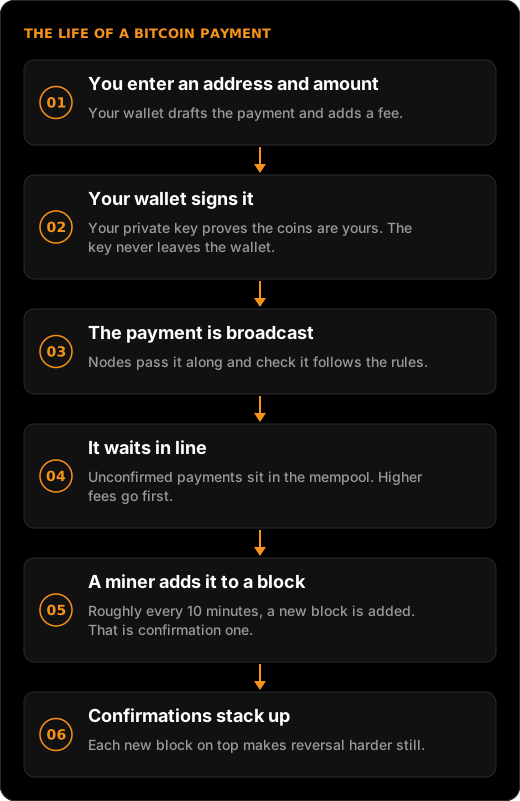
When you enter an address and an amount, your wallet (the app or device that manages your bitcoin) drafts a transaction: a short message that says, in effect, "move this much bitcoin from coins I control to this address."
An address is where bitcoin is sent, a bit like an account number. Modern addresses usually start with "bc1". That format, defined in a Bitcoin standard called BIP 173 (and updated by BIP 350), includes a built-in checksum, a few extra characters computed from the rest. If you mistype a character or two, the wallet will notice and refuse to send. It cannot catch a correct-looking address that belongs to the wrong person, though, which is why you check the first and last few characters every time.
Your wallet also attaches a fee, a small payment to whoever eventually processes your transaction. Fees are not a percentage of the amount. They depend on how much space your transaction takes up and how busy the network is. Sending $10 and sending $10,000 can cost the same fee.
Step Two: You Sign It With Your Key
A note anyone could write is worthless. What makes yours valid is a digital signature, created with your private key, the secret number that proves you own the coins.
The clever part: the signature proves you hold the key without revealing the key itself. Anyone can check the signature using your public key, but nobody can work backward from it to steal your private key. (The details are in Private Keys and Public Keys in Plain English.)
The whitepaper that launched Bitcoin in 2008 describes a coin as "a chain of digital signatures." Each payment is just one more signature added to that chain.
Analogy: Think of it like a check signed with a signature nobody can forge, written in ink that anyone in the world can verify, using a pen that never leaves your pocket.
Step Three: The Payment Goes Public
Your wallet now broadcasts the signed transaction: it sends it out to the Bitcoin network. The network is made up of nodes, computers that keep a copy of Bitcoin's history and enforce its rules.
Each node that receives your transaction checks it. Is the signature valid? Do these coins exist? Have they already been spent? If it passes, the node passes it along to others. Within seconds, your payment has spread across the network.
The coins you are spending are tracked as separate chunks, a bit like bills in a physical wallet. If you pay with a bigger chunk than needed, the leftover comes back to you as "change." How that works is explained in How Transactions Work (UTXOs, Simply).
Step Four: Waiting in Line
At this point your payment is unconfirmed. It is valid, but not yet part of the permanent record. It waits in each node's mempool (short for memory pool), a waiting room for transactions that have not made it into a block yet.
Who gets out of the waiting room first? Mostly, those who paid the highest fee for their size. Miners, the computers that build new blocks, have limited space in each block and tend to pick the transactions that pay them best. When the network is quiet, almost everything gets in quickly. When it is busy, low-fee transactions can wait hours. The full story, including what happens when it gets crowded, is in The Mempool.
Step Five: Confirmed, Then Buried Deeper
Roughly every 10 minutes on average, a miner adds a new block, a batch of transactions, to the blockchain, the shared public record. That target is written into Bitcoin Core, the most widely used Bitcoin software. When your transaction lands in a block, it has one confirmation.
Every block added after that one is another confirmation. Each one makes your payment harder to undo, because rewriting it would mean redoing all the work in every block on top. That is why many services wait for several confirmations on larger payments. There is no fixed rule, but a common convention is six, about an hour; Bitcoin.org suggests six as a minimum for high-value transfers.
| What your wallet shows | What is actually happening |
|---|---|
| Sending | Your wallet is signing and broadcasting the transaction |
| Pending or unconfirmed | Valid and spreading, waiting in the mempool |
| 1 confirmation | Included in a block on the blockchain |
| 6 confirmations | Five more blocks on top; a common threshold for large payments |
Why There Is No Undo Button
Once confirmed, a payment is final. Bitcoin.org states it directly: a Bitcoin transaction "cannot be reversed, it can only be refunded by the person receiving the funds." There is no bank to call and no dispute form.
That finality is a feature for the receiver and a responsibility for the sender. It is also why scammers like crypto payments, which is why our scams guide treats any request for crypto payment as a red flag.
What This Means for You
- Check the address twice. Compare the first and last few characters. The checksum catches typos, not the wrong recipient.
- Send a small test first. For a large or first-time payment, a small amount proves the address works. The sats converter helps you pick one.
- Treat "pending" as normal. Unconfirmed is a waiting room, not an error. Patience usually solves it.
- Pay attention to the fee. A low fee saves money but can mean a longer wait when the network is busy.
- Remember it is final. Only the receiver can send it back.
Tap, sign, wait, confirm. The magic is that no one in the middle had to say yes.